


This applies to all VamTam Elementor themes that include Services boxes.
If you notice that the Services boxes appear broken, check the steps below to resolve:

It's usually caused by adding the link to the Icon's widget:

Please note that Elementor has this limitation: Don't add links to elements nested in this container - it will break the layout.
The same issue happens if any of the inner containers inside the Service box has its HTML tag set to “a (link)”. To check this:
- Open the Navigator (Structure) panel and expand the Service’s Container.
- Click on each inner container and go to Layout tab > Additional Options.
- If the HTML Tag is set to “a (link)”, change it back to “div”.
- Also check the widgets inside the box (Icon, Image, Heading, Button) and make sure their Link field is empty. For Image widgets, set Link to “None”.
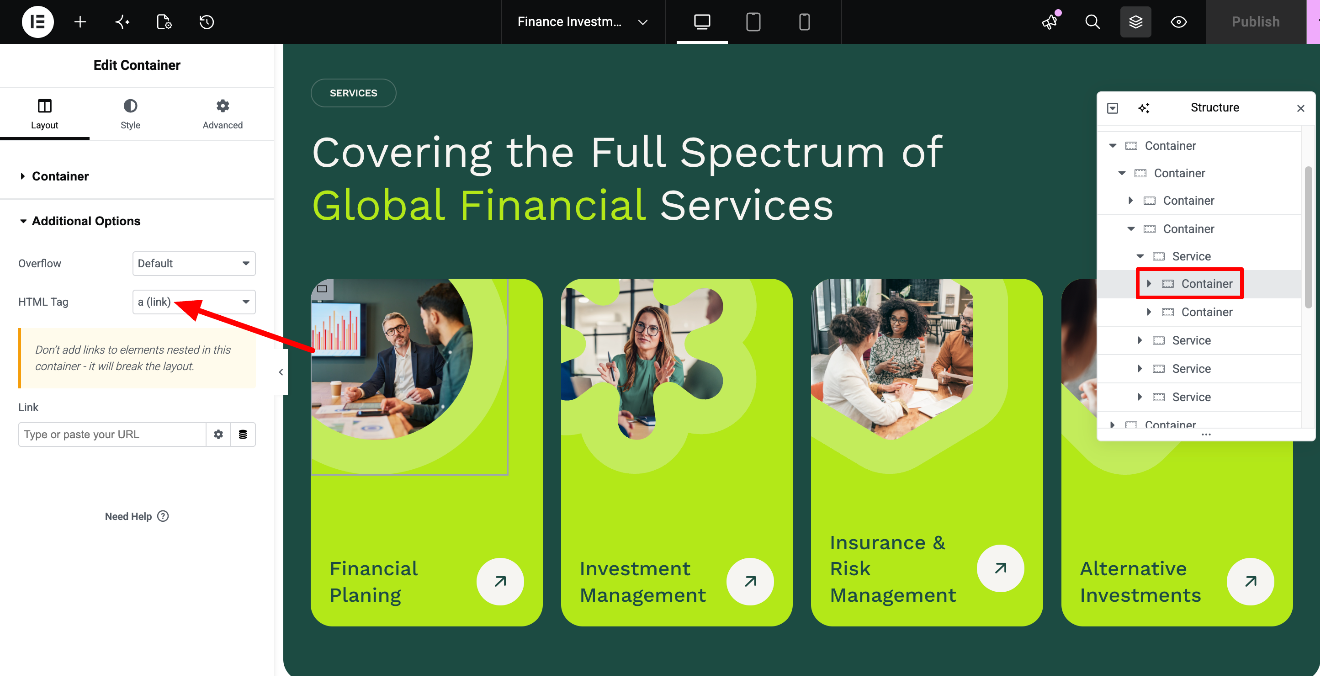
The right way of adding a link is to go to each Service's Container > Layout tab > Additional Options section:
